Blog ·
Quran Radio: listen to the Quran all day, even offline
From the morning commute to the last minutes before sleep: how to let Quran Radio follow you through the day, with or without internet.
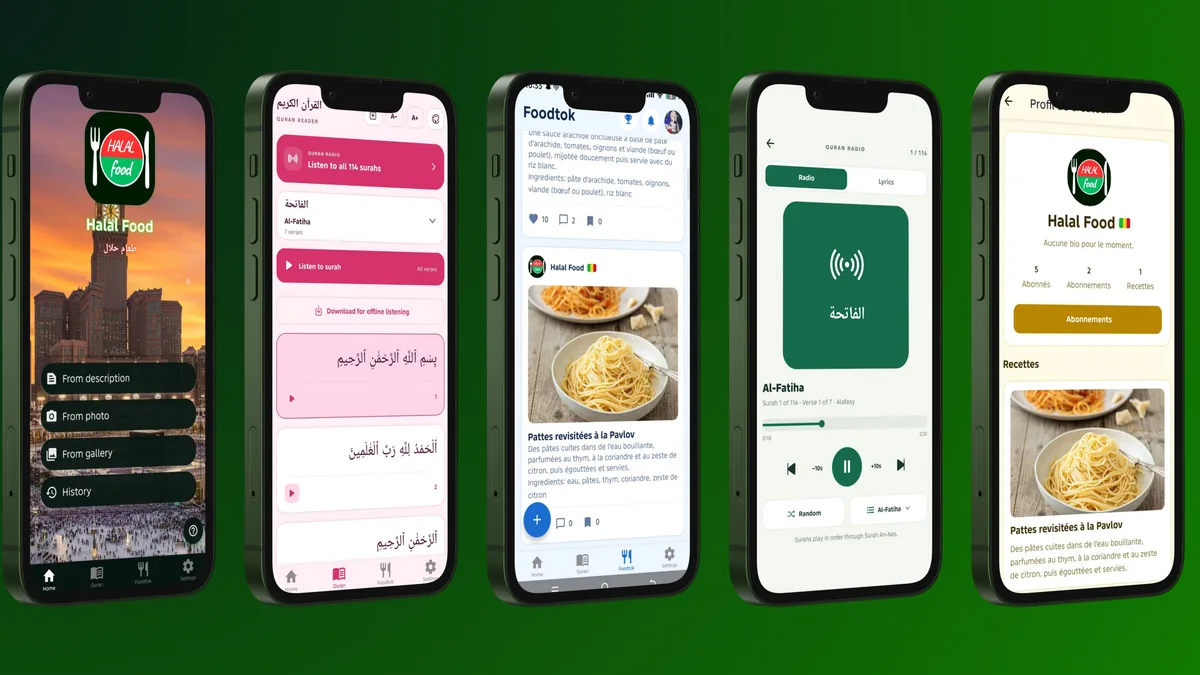
Listening is often easier than finding time to read. Quran Radio, in the Halal Food app, plays the recitation of Mishary Alafasy from one surah to the next, so the Quran can accompany the ordinary moments of your day.
Press play once
Open Quran Radio and press play. When a surah ends, the next one starts by itself, all the way to An-Nas. The recitation keeps going when you lock your phone or switch to another app, and you can pause it from the lock screen.
Moments that fit a surah
- On the way to work or school: the short surahs at the end of the Quran last only a few minutes.
- While cooking or cleaning: let the radio run from surah to surah, no hands needed.
- On Friday: many Muslims read or listen to Surah Al-Kahf (18).
- Before sleeping: Surah Al-Mulk (67) is a common choice.
Pick a surah from the list or search for it by name. To discover one you rarely hear, press Random.
Read along while you listen
The Lyrics tab shows the Arabic text of the surah that is playing, verse by verse. Tap a verse to jump to it, and use the 10-second buttons to repeat a passage you are learning. Arabic letter colours help if you are still learning to read.
No connection? Download first
Use “Download for offline listening” on a surah, or download several from the downloads menu, preferably on Wi-Fi. Downloaded surahs then play on a plane, in the metro or anywhere without a signal.
A reminder that chooses for you
In Settings, turn on the Daily surah reminder and choose a time. Every day at that moment, Halal Food suggests a random surah to listen to on Quran Radio. You can change the time or turn it off whenever you like.
Quran Radio is free, like the rest of Halal Food, on iPhone, iPad and Android.